

Enterprise CI/CD Pipeline Checklist for 2026
The future of CI/CD pipelines is here. By 2026, automation and AI have reshaped software delivery, making pipelines faster, smarter, and more secure. But challenges remain: teams now spend significant time managing AI-generated code, dealing with CI failures, and ensuring security. Here’s a quick summary of how to build a modern pipeline that addresses these issues:
- AI-driven automation: Use tools that auto-fix failures, suggest solutions, and handle large volumes of AI-generated pull requests.
- Security-first approach: Integrate features like RBAC, SBOMs, and short-lived credentials to safeguard your pipeline.
- Performance metrics: Track DORA metrics (e.g., Deployment Frequency, MTTR) and aim for sub-10-minute pipelines.
- Scalable infrastructure: Ensure compatibility with tools like GitHub Actions, Kubernetes, and GitOps to handle growing workloads.
- Testing and deployment: Use parallel testing, canary releases, and automated rollbacks to maintain reliability.
With AI-powered, self-healing systems, enterprises can reduce CI-related downtime by up to 90%, saving both time and money. Ready to optimize your pipeline? Let’s dive into the details.
Building Enterprise-ready CI/CD Pipelines using Agentic AI | Chinmay Gaikwad | Conf42 DevOps 2026
sbb-itb-3b7b063
Planning Before Implementation
Before diving into pipeline code, it’s crucial to define what success looks like. Thoughtful planning is what separates pipelines that drive business value from those that merely execute builds. The key is to focus on outcomes that matter - like time-to-value, reliability, and cost control - rather than just technical metrics.
Set Clear Goals and KPIs
Start by measuring DORA metrics: Deployment Frequency, Lead Time for Changes, Change Failure Rate, and MTTR. These metrics are the industry standard for balancing speed and stability. Additionally, track Flow Efficiency - the ratio of active work time to total time - to identify bottlenecks in your code delivery process. Organizations that establish clear protocols for responding to KPI deviations see a 31% higher success rate in meeting their performance goals.
For a well-rounded approach, balance your metrics with a 60/40 split between leading indicators (such as pull request size and time to first review) and lagging indicators (like quarterly revenue or churn). Define specific quality gates, such as requiring 80% code coverage for critical business logic and ensuring your test suite runs in under 15 minutes by leveraging parallel execution. Keep pull requests manageable - between 200 and 300 lines of code - since larger PRs often increase lead times and failure rates.
Once your goals are set, ensure your infrastructure and tools are equipped to support them.
Check Infrastructure and Tool Compatibility
Evaluate where your code lives and choose tools that integrate seamlessly. For example, use GitHub Actions if your repository is on GitHub or GitLab CI for GitLab-based workflows. Determine if Kubernetes-native tools are necessary or if your pipeline needs to accommodate legacy systems like Jenkins.
Enable OIDC support to move away from static credentials and adopt short-lived, secretless authentication. Create a catalog of all required cloud providers, registries, and APIs. To avoid unexpected failures, pin tool versions, runner images, and action references to exact SHAs or version tags rather than using floating tags. With AI-generated code now making up 41% of global code, ensure your infrastructure can handle the increased volume of pull requests.
After verifying compatibility, turn your attention to compliance and security requirements to protect your pipeline.
Review Compliance and Security Requirements
Understand the regulatory frameworks that apply to your pipeline, such as NIST SP 800-204D, ISO/IEC 27001, PCI DSS, HIPAA, SOC 2, or GDPR. Each framework has specific guidelines for identity governance, audit logging, and secure change control. Implement RBAC (Role-Based Access Control) and enforce least privilege for all users and service accounts.
Your pipeline should generate a Software Bill of Materials (SBOM) and adhere to Supply Chain Levels for Software Artifacts (SLSA) maturity standards. Automating compliance checks can cut audit times by up to 25%. For example, in August 2025, Microsoft centralized 92% of its commercial cloud production pipelines using governed templates with embedded security measures, completing the rollout in just two quarters. To enhance security, configure session token durations to 15–30 minutes for deployment stages and 5–10 minutes for high-risk IAM changes. Clearly define trust boundaries by constraining OIDC trust policies to specific claims rather than using broad wildcards.
Selecting and Setting Up Tools
Once your planning is wrapped up, the next step is choosing and setting up tools that can handle growing pull request volumes. The right tools can make all the difference between a team that ships confidently and one bogged down by constant CI debugging. Here's a closer look at selecting AI-driven platforms, linking version control systems, and strengthening security and operations.
Select AI-Powered Platforms
When it comes to AI-powered platforms, focus on tools that go beyond just making suggestions. Look for platforms with auto-fix capabilities - ones that analyze failure logs, generate solutions, and automatically resolve CI issues. Tools with extended context windows (e.g., 200,000+ tokens) are also a big plus, as they can analyze your entire repository and understand your existing codebase.
A great example is Kanu AI, which automates infrastructure code generation and performs over 250 validation checks on live systems. It operates within your cloud environment with zero data leaving your boundaries - ideal for industries with strict security requirements. Kanu AI integrates seamlessly with GitHub and GitLab, creates production-ready pull requests, and adheres to SOC 2 Type II compliance with a full audit trail.
For teams in healthcare, finance, or aviation, it's critical to choose platforms with certifications like SOC 2 Type II, ISO/IEC 42001, and ISO 27001. Also, tools with baseline-first gating are helpful, as they differentiate between legacy technical debt and new issues in a pull request. By leveraging auto-healing pipelines, teams can cut CI-related time by 75% to 90%, potentially saving a 20-developer team up to $750,000 annually.
Connect Version Control Systems
It's essential to integrate your version control system directly so pipelines trigger automatically on events like pushes, pull requests, or tags - without relying on external APIs. Storing pipeline definitions (e.g., .github/workflows/ci.yml or .gitlab-ci.yml) in your repository ensures that your CI/CD logic evolves alongside your application code.
For better collaboration, enable Review Apps to deploy each merge request to a temporary environment for live previews before merging. In fast-paced environments, merge trains are invaluable - they test merge requests sequentially against the latest successful state, avoiding conflicts that could disrupt your main branch. If you're working in a monorepo, configure path-based triggers to run jobs only when specific directories are changed, saving resources.
To ensure traceability, tag container images with the Git commit SHA, creating a direct link between your code and the deployed artifact. Additionally, pin third-party actions to specific commit SHAs to minimize supply chain risks. Using concurrency controls to cancel outdated runs when new commits are pushed further optimizes compute resource usage. These practices lay the groundwork for secure, efficient pipeline operations.
Set Up Security and Operations Features
Building on earlier security steps, incorporate features that improve observability and maintain pipeline efficiency. Replace static, long-lived cloud secrets with Workload Identity Federation (OIDC), which issues short-lived, verified identities.
Add multi-layer security scanning to your pipeline, including Static Application Security Testing (SAST), Dynamic Application Security Testing (DAST), and Software Composition Analysis (SCA). Generate a Software Bill of Materials (SBOM) for every build, making it easier to track vulnerabilities across the supply chain. Use minimal base images like Alpine or Distroless, enforce non-root operations, and sign container images to boost security.
Your platform should support concurrent job execution and offer full observability with structured logs (e.g., JSON), Prometheus metrics, and OpenTelemetry tracing. Establish a "break-glass" process for emergencies, using short-lived, heavily monitored credentials in case your OIDC provider fails. Lastly, ensure cloud audit logs capture key metadata - like repository names, run IDs, and commit SHAs - to support quick forensic investigations when needed.
Building, Testing, and Deploying
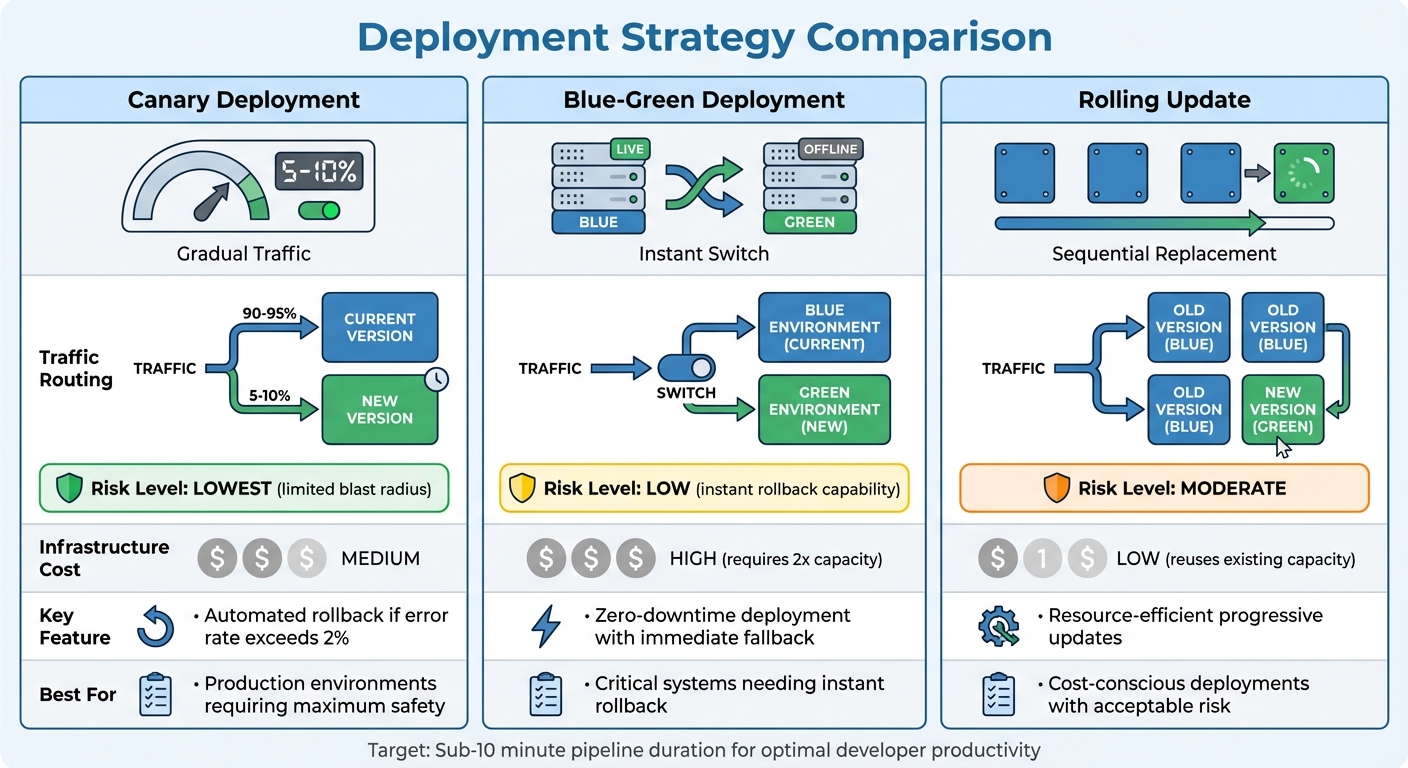
CI/CD Deployment Strategies Comparison: Canary vs Blue-Green vs Rolling Updates
With your tools ready, it's time to dive into the key stages of your pipeline - building, testing, and deploying. These steps are crucial for ensuring both speed and confidence in your production process. By combining earlier planning with solid execution, you can turn strategy into dependable operations.
Automate Build, Test, and Deploy Steps
Automation is your best friend here. Use multi-stage Docker builds to compile code, run tests, and transfer only essential binaries to lean base images. This not only reduces the image size but also minimizes the attack surface. For traceability, tag each image with the Git commit SHA, allowing you to directly link code changes to deployed artifacts.
Stick to immutable artifacts - build your container image once and deploy it consistently across Dev, Staging, and Production. This eliminates the risk of environment drift and aligns perfectly with the KPIs and infrastructure checks you've already set up.
AI-generated code introduces unique challenges, like pattern drift and dependency bloat, that standard CI checks might overlook. A 14-person engineering team tackled this in 2025 by implementing a four-stage AI quality gate. The result? Production bugs dropped by 71% (from 8.2 to 2.4 per month), and human PR review time decreased from 38 to 22 minutes. Marcus Rodriguez, Lead DevOps Engineer, summed it up well:
The teams that treat AI code quality as a CI/CD problem, not a review problem, are the ones shipping fast without accumulating debt.
Once these automated processes are in place, you can shift focus to integrating essential security checks.
Add Security Checks at Each Stage
Security should be baked into every phase of your pipeline. Use tools like Static Application Security Testing (SAST), Dynamic Application Security Testing (DAST), and Software Composition Analysis (SCA) to catch vulnerabilities early. Pre-commit hooks with tools such as ShieldCommit or Gitleaks can prevent sensitive data from ever reaching your repository.
To avoid supply chain attacks, pin third-party CI actions to specific commit SHAs instead of mutable tags. Generate a Software Bill of Materials (SBOM) for each release to track vulnerabilities in your dependencies. When updating databases, follow the "Expand-Migrate-Contract" strategy to reduce deployment risks.
Use Parallel Testing and Gradual Deployments
Keep your pipeline efficient - aim for a total duration of 5-10 minutes. Anything longer, and developers are likely to lose focus and productivity. Shard your test suites across multiple runners, using runtime data to balance the load. This can cut test times by up to 70%. Run your quickest checks first - if a linter fails in 30 seconds, there's no need to waste 10 minutes on integration tests.
For deployment, Canary releases are often the best choice. Start by routing 5-10% of traffic to the new version and monitor metrics like error rates and latency. If everything looks good, gradually increase traffic. If errors spike above 2%, roll back automatically. This method keeps issues contained.
Other deployment strategies include Blue-Green deployments, which allow for instant rollbacks by switching between two identical environments but require double the infrastructure. Rolling updates, on the other hand, gradually replace instances while reusing existing capacity.
| Deployment Strategy | Traffic Routing | Risk Level | Infrastructure Cost |
|---|---|---|---|
| Canary | Small % (5-10%) to new version first | Lowest (limited blast radius) | Medium |
| Blue-Green | Instant switch between two identical environments | Low (instant rollback) | High (requires 2x capacity) |
| Rolling | Gradual replacement of instances | Moderate | Low (reuses capacity) |
To maintain stability, set up automated rollbacks. For example, if error rates exceed 2% for more than 2-3 minutes, the pipeline should automatically revert to the previous version. This ensures your production environment remains stable, even when issues sneak past earlier checks.
Monitoring and Improving After Deployment
Once your code is live, the real challenge begins. Deployment isn't the end - it's the starting point for ongoing improvement. Without consistent monitoring and updates, even the most efficient pipeline can falter over time. By focusing on continuous monitoring and refinement, you can turn post-deployment performance into a competitive edge.
Add Observability Tools
Keep an eye on key metrics like build duration (95th percentile), queue time, build success rate (aim for above 90%), Mean Time to Recovery (MTTR) (elite teams recover in under an hour), and flaky test rate (tests that fail inconsistently can undermine developer confidence in your CI system).
Modern observability tools go beyond simple monitoring by offering distributed tracing and actionable diagnostics. For example, integrating OpenTelemetry (OTel) allows you to treat each pipeline run as a distributed trace, where every job is a "span." This gives you detailed, step-by-step visibility into pipeline performance. Tools powered by AI take this a step further by identifying issues and even suggesting fixes. Platforms like Kanu AI analyze logs and metrics, running hundreds of validation checks to surface patterns and provide diagnostics - no manual digging required.
By 2026, AI troubleshooting has become the norm. When failures occur, these platforms analyze millions of data points, identify root causes, and recommend specific fixes. In some cases, they even push validated corrections directly to your branch, effectively "self-healing" the pipeline.
Review and Refine Regularly
Schedule monthly 30-minute reviews with cross-functional teams - developers, operations, and security - to address inefficiencies and brainstorm improvements. Use DORA metrics (Deployment Frequency, Lead Time for Changes, Change Failure Rate, and MTTR) to measure performance and set improvement goals. For instance, aim to reduce MTTR by 15% over the next quarter.
After incidents, conduct blameless post-mortems to focus on identifying and fixing systemic weaknesses rather than assigning blame. These reviews can help you spot costly patterns early, saving time and resources in the long run.
| Metric | Target Benchmark | Purpose |
|---|---|---|
| Build Duration | Under 10 minutes | Keeps developers productive and minimizes delays |
| MTTR | Under 1 hour | Measures how quickly teams recover from failures |
| Change Failure Rate | Under 15% | Tracks the percentage of releases needing rollback |
| Flaky Test Rate | Under 1% | Ensures reliable and trustworthy test results |
While process reviews are important, don’t overlook the technical side - scalability and compliance are just as critical.
Verify Scalability and Compliance
Monitor resource usage, such as CPU and memory consumption for each pipeline step, to optimize build runners and eliminate unnecessary overhead. Keep an eye on cache hit rates to ensure efficient reuse of prior build results (like Docker layers or node_modules), which can significantly speed up execution.
On the compliance front, keep your processes aligned with current metrics and best practices. For example, use GitOps to make Git the single source of truth for infrastructure and application states. This ensures a clear, version-controlled audit trail. Automate secret rotation - rotate high-value secrets every 30 days, while others can go up to 90 days. To prevent supply chain vulnerabilities, pin third-party CI actions to specific commit SHAs rather than using mutable tags. Additionally, generate a Software Bill of Materials (SBOM) for every release and centralize pipeline logs in an append-only system to maintain an immutable audit trail.
Set concrete goals using Service Level Objectives (SLOs), such as ensuring "95% of builds complete within 10 minutes". Configure your pipeline to check these SLOs - like error rates and latency - before promoting code to production. By 2026, leading teams rely on SLO-based alerts rather than arbitrary thresholds: if users aren't experiencing issues, your pager shouldn't be going off.
Conclusion
Creating an enterprise CI/CD pipeline in 2026 is about much more than connecting tools - it's about building a self-healing, scalable system that adapts as your business grows. The checklist above outlines three essential components: AI-driven automation, shift-left security, and continuous scalability. These aren't just nice-to-haves; they’re the foundation for staying ahead in a competitive landscape.
AI has advanced far beyond basic code suggestions. Today’s pipelines rely on autonomous agents that can identify failures, apply fixes, and validate changes without requiring human input. This level of automation is essential to managing the ever-increasing volume of code and avoiding bottlenecks during validation and merging. By streamlining these processes, AI not only boosts efficiency but also lays the groundwork for stronger security and scalable operations.
Security, on the other hand, must be integrated at every stage of the pipeline. It’s not just an afterthought - it’s a critical safeguard. As Lorikeet Security aptly puts it:
A developer laptop compromise gives an attacker access to whatever that developer can reach. A pipeline compromise gives the attacker access to everything the pipeline can reach.
This highlights the stakes: a compromised pipeline can jeopardize all connected systems, far surpassing the damage of a single-device breach.
With AI automation and embedded security in place, scalability becomes the final piece of the puzzle. Monitoring key DORA metrics and enforcing rapid build times - such as a sub-10-minute build rule - are crucial for maintaining fast, reliable delivery. Practices like GitOps provide a clear audit trail, ensuring transparency and control. The numbers speak for themselves: by 2026, elite teams will deploy code an average of 1,200 times per day, marking a 30% jump from 2024. Your pipeline needs to support this pace, not hinder it.
In 2026, the enterprises that succeed won’t just automate - they’ll create self-healing systems that transform software delivery into a competitive edge. Start with the basics, measure progress consistently, and let AI handle the repetitive tasks so your team can focus on driving innovation.
FAQs
What should I automate first to get a self-healing CI/CD pipeline?
To create a self-healing CI/CD pipeline, the first step is automating how failures are detected and resolved. This is where autonomous AI tools come into play. These tools can analyze pipeline failures, suggest or even implement fixes, and validate those fixes in real time. By doing this, you can cut down on manual troubleshooting, significantly improve Mean Time to Repair (MTTR), and maintain consistently successful builds. This automation sets the stage for a truly self-healing system.
How do I use OIDC and short-lived credentials without breaking deployments?
To keep things secure in 2026, you should move away from relying on static secrets and instead use ephemeral identities through workload identity federation. This approach allows your CI/CD tools to request temporary tokens directly from OIDC providers such as AWS, Azure, or Google Cloud. By doing so, you reduce the chances of secret sprawl and ensure that credentials automatically expire after a short period.
It's equally important to build your pipeline architecture with mechanisms to audit and manage token usage. This ensures you maintain security while avoiding any disruptions during deployments.
What’s the fastest way to cut pipeline time under 10 minutes?
To cut pipeline time to under 10 minutes, concentrate on three key strategies: parallelization, caching, and test optimization.
- Parallelization: Run jobs at the same time to make the most of multiple cores or processors.
- Caching: Store dependencies so that they don’t need to be re-downloaded or rebuilt repeatedly.
- Test Optimization: Break tests into smaller groups (sharding) or focus on the most critical ones to speed things up.
Go a step further by automating everything possible and using high-performance hardware or cloud-based resources. When combined, these techniques can drastically reduce runtime and get your pipeline running in under 10 minutes.