
What Are AI Agents in Software Development?
AI agents in software development are autonomous systems that handle tasks like writing code, fixing bugs, or managing deployments with minimal human input. Unlike traditional tools, they work independently, following a loop of reasoning, acting, observing, and iterating to achieve goals.
Key Features:
- Perception: Understands codebases, tickets, and designs.
- Reasoning: Plans actions to meet objectives.
- Action: Executes tasks like coding, testing, and deployments.
- Memory: Retains context for long workflows.
Types of AI Agents:
- Intent Agents: Translate requirements into actionable tasks.
- DevOps Agents: Automate infrastructure, CI/CD, and monitoring.
- QA Agents: Handle testing, validation, and bug fixes.
Benefits for Teams:
- Saves time: 70% of users report faster task completion.
- Improves quality: Teams see up to 45% better software reliability.
- Reduces delivery time: Speeds up releases by 16–30%.
By 2028, over 33% of enterprise apps are expected to use AI agents, transforming workflows and enabling developers to focus on higher-value tasks.
Agentic Coding: The Future of Software Development with Agents
Main Types of AI Agents in Software Development
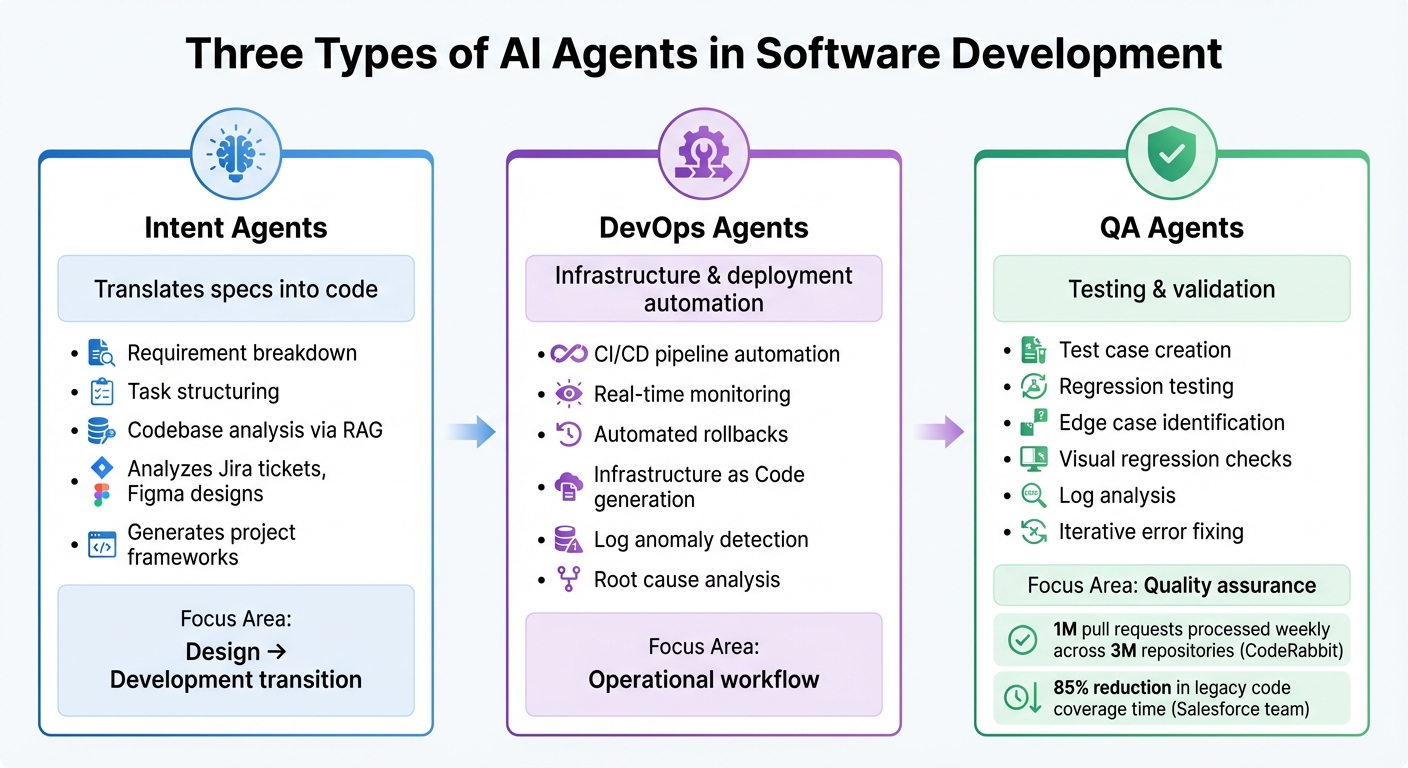
Three Types of AI Agents in Software Development: Roles and Capabilities
AI agents play a pivotal role in software development, streamlining various stages of the development lifecycle. These agents are typically divided into three categories: Intent Agents, DevOps Agents, and Quality Assurance (QA) Agents. Each type focuses on specific tasks and phases, working toward the common goal of improving efficiency and reducing manual effort.
Intent Agents
Intent agents take high-level requirements and turn them into actionable plans. They can analyze inputs like Jira tickets, Figma designs, and stakeholder discussions to create structured technical tasks. By leveraging Retrieval-Augmented Generation (RAG), they review existing codebases to ensure that new code aligns with team conventions and architectural standards.
These agents significantly cut down delays between design and development by instantly generating project frameworks and draft issues. This seamless transition from requirements to project setup sets the foundation for automating further stages of the development process.
Once the groundwork is laid, DevOps agents step in to manage the operational aspects of development.
DevOps Agents
DevOps agents handle the operational workflow, automating tasks like infrastructure provisioning, CI/CD pipelines, and deployment management. They monitor system telemetry in real time, identify anomalies in logs, and even trigger rollbacks when deployments fail. Additionally, they generate Infrastructure as Code (e.g., Terraform configurations), detect error patterns, and assist in identifying root causes during incidents.
By taking over repetitive tasks and minimizing downtime, DevOps agents streamline resource provisioning and pipeline management, allowing developers to focus on more complex challenges.
Quality Assurance Agents
QA agents focus on automating the testing and validation processes. They write test cases, execute regression tests, and identify edge cases that might escape human testers. These agents also perform visual regression checks, analyze system logs for production readiness, and iteratively fix errors until all tests pass.
For example, CodeRabbit, an AI code review tool, processes 1 million pull requests weekly across 3 million repositories. In another case, a Salesforce team reported an 85% reduction in legacy code coverage time by using AI-assisted test generation in early 2026. By enhancing testing efficiency and accuracy, QA agents ensure higher-quality outputs and smoother development cycles.
| Agent Type | Primary Function | Key Capabilities |
|---|---|---|
| Intent Agents | Translates specs into code | Requirement breakdown, task structuring, codebase analysis |
| DevOps Agents | Infrastructure & deployment | CI/CD automation, real-time monitoring, automated rollbacks |
| QA Agents | Testing & validation | Test case creation, regression testing, log analysis |
How AI Agents Work in Development Workflows
AI agents stand out by autonomously completing entire tasks, unlike traditional coding assistants that rely on user commands to proceed.
Patterns and Capabilities of AI Agents
A common approach for many AI agents is the ReAct loop - reason, act, observe, and iterate - which they use repeatedly until achieving their goal. Alex Mrynskyi from AgenticLoops AI puts it succinctly:
"The magic of Claude Code and GitHub Copilot isn't the LLM. It's the loop."
For example, when tasked with "Build a REST API", these agents break the goal into smaller, manageable steps. They then tackle each step using the ReAct loop. They also connect with external systems through the Model Context Protocol (MCP), enabling tasks like testing, retrieving design data, or managing repositories. Many agents even incorporate self-correction, scanning code with tools such as CodeQL to identify and fix issues before presenting their work for review.
For larger, more complex projects, the Ralph pattern offers a different strategy. Instead of relying on large context windows, this approach uses git history and logs to maintain state across hundreds of files. Geoffrey Huntley, who introduced the concept, emphasizes:
"Better to fail predictably than succeed unpredictably."
These advanced methods and tools allow AI agents to handle sophisticated tasks effectively throughout the development process.
Automation Across Development Stages
AI agents excel at automating various stages of the development workflow, thanks to their planning and reasoning abilities. During the coding phase, they work asynchronously in temporary environments like GitHub Actions - creating branches, writing code, and opening pull requests - allowing developers to focus on strategic, higher-level tasks.
In debugging and testing, these agents generate test suites, identify edge cases, and resolve errors until tests pass. When it comes to deployment, specialized agents monitor systems, flag issues such as HTTP 500 errors, analyze logs, create GitHub issues, and even implement hotfixes or adjust resources as needed.
The impact of these capabilities is evident in real-world applications:
- Google: In 39 internal code migrations involving 93,574 edits, AI agents authored 74% of the changes, cutting engineer time in half.
- Ramp: The Devin agent removed 150 feature flags in a single month, saving over 10,000 engineering hours.
- Anthropic: AI agents wrote 90–95% of Claude Code's codebase.
These examples highlight how AI agents improve productivity and software quality, reducing delivery times while ensuring reliability.
| Interaction Type | AI Assistants (wait for input) | AI Agents (operate independently) |
|---|---|---|
| Work Style | Synchronous | Asynchronous |
| Scope | Single-file suggestions | Multi-file workflows and pull requests |
| Execution | Suggests code only | Runs commands, executes tests, opens PRs |
| Developer Role | Performs the heavy lifting | Reviews and approves agent output |
sbb-itb-3b7b063
Kanu AI: AI Agents for Cloud Engineering
Kanu AI takes the concept of AI agents and applies it to cloud engineering, streamlining the entire delivery process. With a focus on enterprise cloud engineering, Kanu AI uses three specialized agents to automate tasks from infrastructure setup to application delivery. Operating securely as a single-tenant service within your AWS account, it ensures strict security measures while handling both infrastructure and application workflows.
Intent Agent for Requirement Capture
The Intent Agent kicks off the delivery process by gathering project requirements and resolving ambiguities with targeted questions. Its primary goal is to highlight decisions that require human judgment, especially around system-level tradeoffs. As requirements evolve, it maintains an updated delivery specification that reflects these changes. According to Kanu AI:
"Captures intent and system level tradeoffs. Surfaces only decisions that require human input. Maintains an auditable delivery spec that evolves as requirements change."
This "living" specification grows smarter over time, learning from past decisions to align with team preferences. By doing so, it minimizes unnecessary disruptions, ensuring that only critical choices are brought to the forefront.
DevOps Agent for Deployment Automation
The DevOps Agent takes the specifications from the Intent Agent and transforms them into actionable code, generating both application code and infrastructure-as-code (using tools like Terraform, CDK, or CloudFormation). It deploys this code directly into your cloud environment, continuously monitoring performance through logs, metrics, and traces. In cases of deployment failures, the agent autonomously analyzes logs, adjusts configurations, and retries until everything runs smoothly. This approach has enabled organizations using Kanu AI to achieve delivery speeds that are 80% faster, from initial requirements to production. Unlike tools that merely suggest code, this agent manages the entire deployment cycle, ensuring seamless execution.
Quality Assurance Agent for System Validation
The Quality Assurance Agent performs over 250 validation checks on the deployed system, using real endpoints and actual data paths. It monitors logs, metrics, and traces to identify and diagnose failures. When issues arise, it triggers the DevOps Agent to make necessary adjustments and redeploy. As Kanu AI explains:
"When a validation fails or an error appears, Kanu checks logs, updates code and infrastructure, and runs the loop again. The cycle continues until the deployment is ready for production."
Once all validations are successfully completed, the agent opens a pull request for review, ensuring that the system being evaluated is production-ready, not untested code.
How to Integrate AI Agents Into Development Processes
AI agents can transform development workflows by automating repetitive tasks and freeing up time for more strategic work. Here's how to seamlessly bring them into your processes.
Steps to Integrate AI Agents
You don’t need to overhaul your entire tech stack to integrate AI agents. Start by identifying bottlenecks - tasks that are repetitive and time-consuming, like updating documentation, generating test cases, triaging tickets, or refactoring boilerplate code. Focus on one task that could save your team 10+ hours per week to demonstrate quick ROI.
Begin with a pilot program in a low-risk, isolated environment like internal tools or documentation repositories. This approach helps prove the value of AI while building trust and confidence among your team before expanding to production systems. To maintain quality and security, establish clear guidelines. Create a copilot-instructions.md file outlining coding conventions and architecture standards. Additionally, enforce branch protections requiring human review for all AI-generated pull requests.
For seamless integration, use API-first protocols (e.g., MCP) to connect AI agents with your existing CI/CD pipelines, Jira boards, Slack channels, and external tools like Notion or Figma. This allows agents to operate effectively without requiring you to rework your integration layers. As Code Particle puts it:
"The goal is to create an AI-enhanced workflow where intelligent agents handle the busywork and humans focus on innovation".
Track AI performance using observability tools that monitor prompt accuracy, response quality, and merge times. Tailor the AI models to the task - use advanced models for complex refactoring and lighter, faster ones for routine scaffolding. Following these steps can streamline workflows and unlock scalable automation.
AI Agent Capabilities vs. Manual Methods
The table below compares traditional development workflows with AI-driven approaches, highlighting the efficiency AI agents bring to the table:
| Feature | Manual Development | AI Agent-Driven Development |
|---|---|---|
| Workflow Type | Synchronous (developer-led) | Asynchronous (agent works in background) |
| Task Handling | Sequential; one task at a time | Parallel; handles multiple issues simultaneously |
| Environment | Local developer machine | Isolated cloud environment (e.g., GitHub Actions) |
| Output | Manual branch creation, commits, and PRs | Automated branch creation and pull requests |
| Transparency | Local AI decisions often untracked | Every step logged in commits and session logs |
| Scalability | Limited by headcount and developer hours | Scales with compute; handles boilerplate at scale |
Switching from synchronous "pair programming" to asynchronous "peer programming" allows AI agents to work independently, opening draft pull requests for human review. This parallel processing lets agents handle multiple tasks simultaneously, enabling developers to focus on strategic planning and creative problem-solving. For example, in 2025, over 36 million developers joined GitHub, with 80% using Copilot within their first week. This rapid adoption shows how effective integration can drive immediate results.
Conclusion
Key Benefits of AI Agents
AI agents are reshaping software development, speeding up delivery timelines by as much as 40% and improving code quality by over 30%. They manage this through features like continuous testing, real-time bug detection, and automated validation processes.
The real game-changer? AI agents take over repetitive tasks such as updating dependencies, generating tests, and maintaining documentation. By 2026, 85% of developers are expected to use AI coding tools regularly, with 41% of all code being either AI-generated or AI-assisted. Among those using AI agents, 70% report noticeable time savings on specific tasks.
Unlike older autocomplete tools, modern AI agents operate autonomously. They work quietly in the background, creating pull requests for human review while developers focus on high-priority tasks. These agents even work around the clock, handling bug triages overnight to keep projects moving forward. As Dharmesh Patel from Inexture says:
"AI agents aren't just tools. They're partners in productivity, enabling faster releases, stronger code quality, and less burnout".
These innovations are laying the groundwork for even bigger changes in the way software is developed.
What's Next for AI in Software Development
With these advancements, developers are shifting their roles - guiding AI-generated outputs instead of manually writing every line of code. Gartner forecasts that by 2028, over 33% of enterprise software will include AI agent functionalities, a sharp rise from less than 1% in 2024.
The next evolution involves multi-agent systems, where specialized agents handle distinct tasks like testing, deployment, and documentation. These agents will work together using standardized communication protocols to manage complex workflows. Instead of rigid YAML configurations, natural language automation will allow developers to describe their goals in plain English. As Idan Gazit, Head of GitHub Next, explains:
"Any time something can't be expressed as a rule or a flow chart is a place where AI becomes incredibly helpful".
The future isn't about replacing developers - it’s about amplifying their capabilities and enabling them to achieve more.
FAQs
How are AI agents different from AI coding assistants?
AI agents are self-governing systems designed to think, plan, and carry out tasks with little to no human involvement. They can manage intricate workflows, such as analyzing requirements, writing and testing code, and even coordinating tasks across multiple stages. On the other hand, AI coding assistants are more responsive tools. They offer suggestions or code completions based on the immediate context provided by the developer.
The main distinction lies in their functionality: AI agents handle multi-step tasks autonomously, while coding assistants focus on providing targeted, real-time support to boost a developer's efficiency.
What guardrails keep AI agents safe in production workflows?
AI agents used in production workflows are protected by key security measures like access control, action validation, and ongoing monitoring to reduce the risk of unintended actions. These safeguards are bolstered by integrated safety mechanisms, including self-reviews, security scans, and compliance checks. Furthermore, responsible use policies establish clear operational boundaries, helping ensure that AI agents operate securely and dependably while keeping risks in check during deployment.
What’s the best first task to pilot with an AI agent?
A smart way to start using an AI agent is by assigning it straightforward, well-defined tasks like fixing bugs or adding small features. These types of jobs are ideal for demonstrating the agent's ability to follow precise instructions. Plus, it’s a low-risk way to integrate AI into your development workflow without adding unnecessary complications.