
Top 8 Cloud Delivery Challenges and Solutions
Cloud delivery isn't easy. While 94% of organizations rely on cloud services, many face issues like high costs, security risks, and deployment failures. For example, 84% struggle with managing cloud spending, and 70% of security breaches result from misconfigurations. These challenges can increase financial losses and slow innovation. Here's a breakdown of the eight biggest challenges and their solutions:
- Complex Deployment Pipelines: Multi-cloud setups make deployment tricky. Use AI tools for automation and consistency.
- Deployment Verification Failures: Bad deployments cause outages. Automate health checks and rollbacks.
- Multi-Cloud Management: Managing multiple platforms increases complexity. Unified orchestration tools simplify operations.
- Compliance and Security: Manual reviews slow development. Policy-as-Code automates compliance checks.
- Manual Operations: Repetitive tasks waste time. AI-driven automation improves efficiency.
- Cost Control: Hidden fees and idle resources inflate costs. Real-time monitoring and dynamic scaling help.
- Tool Integration: Disconnected systems cause delays. Choose platforms that work with existing workflows.
- Production Readiness: Manual reviews miss issues. Automated validation ensures smooth deployments.
These solutions, like AI-powered tools and automation, save time, reduce costs, and improve reliability. By addressing these challenges, businesses can optimize cloud delivery and focus on growth.
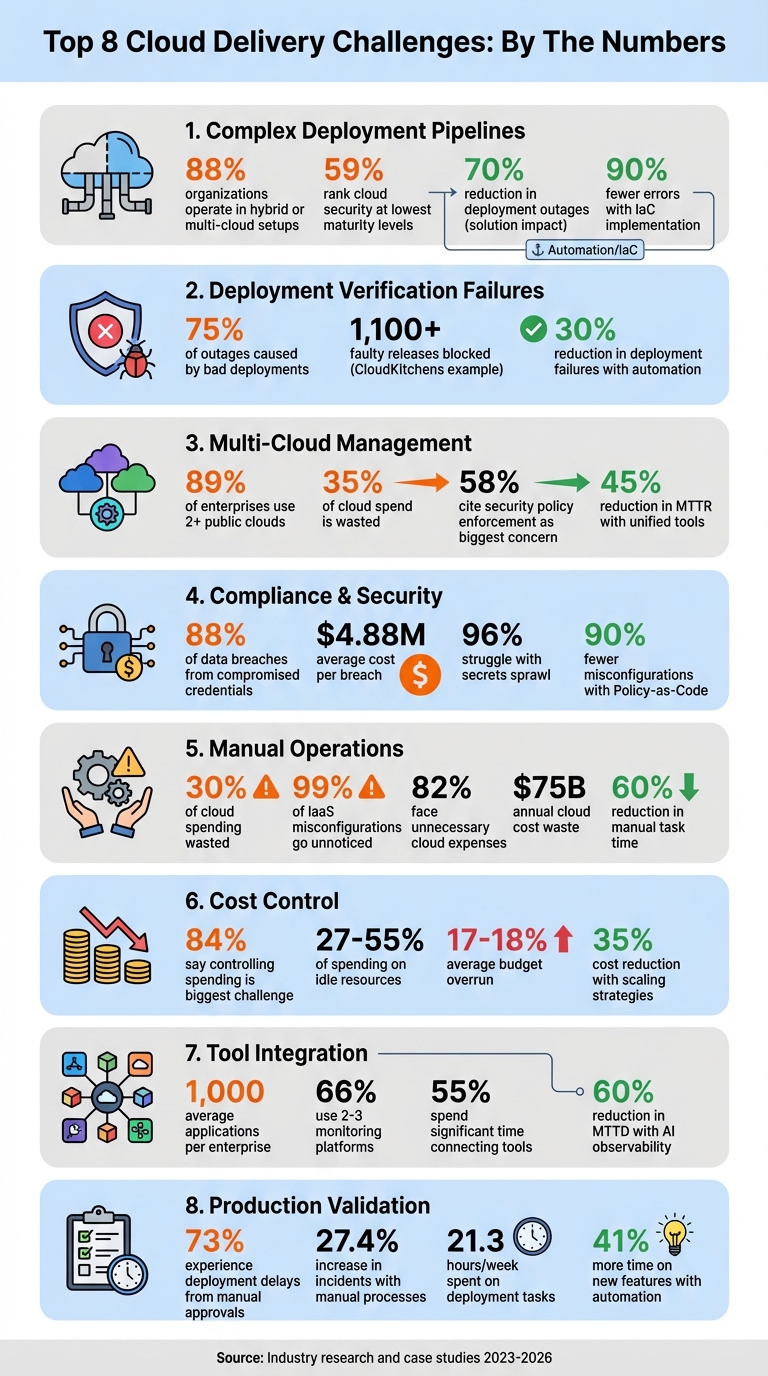
8 Cloud Delivery Challenges: Key Statistics and Impact
What do global leaders say about today’s cloud challenges? (2025 Cloud Complexity Report)
sbb-itb-3b7b063
Challenge 1: Complex Deployment Pipelines
Managing deployment pipelines in a multi-cloud environment is no small feat. With 88% of organizations now operating in hybrid or multi-cloud setups, teams are juggling workflows across platforms like AWS, Azure, and Google Cloud. Each provider has its own CI/CD tools, APIs, and configuration styles, making it tough to maintain consistency. This complexity often leads to issues like configuration drift, mismatched IAM policies, and API inconsistencies.
For instance, emergency fixes made directly in cloud consoles often don’t get reflected in the codebase. This means the next deployment might overwrite critical settings or fail altogether. It’s no surprise that 59% of organizations rank their cloud security and operational processes at the lowest maturity levels. Configuration drift is a major culprit here.
"If you don't have a toolchain that ties all these processes together, you have a messy, uncorrelated, chaotic environment." - Robert Krohn, Head of Engineering, Atlassian
The reliance on key personnel to navigate these complexities compounds the issue. When those team members are unavailable, deployments can stall entirely.
Solution: AI-Powered Pipeline Automation
AI-powered tools are stepping in to simplify deployment pipelines by automating repetitive and error-prone tasks. These tools can generate Infrastructure-as-Code (IaC) templates from plain English descriptions, saving engineers hours of manual work. Instead of writing endless lines of configuration, teams can describe their needs, and AI handles the initial setup.
Automated orchestration platforms also streamline deployment by linking version control systems directly to cloud providers. They manage credentials securely, eliminating the risks associated with long-lived access keys. With over 75% of developers now using AI tools daily, this kind of pipeline automation is rapidly becoming a standard practice.
AI isn’t just about setup - it also helps maintain consistency. AI-driven drift detection continuously scans live infrastructure and compares it to the defined code. When discrepancies arise - whether from manual changes or API glitches - the system flags them immediately. Some tools even auto-correct these issues, ensuring environments stay aligned without requiring human intervention.
Take Booking.com, for example. In June 2023, they implemented blue-green deployments and canary releases across AWS and Azure under Maria Ivanova’s guidance. This approach cut deployment-related outages by 70% and increased deployment frequency from weekly to daily.
Policy-as-Code tools like Open Policy Agent add another layer of security by blocking non-compliant changes before they reach production. This prevents errors like unencrypted storage buckets or overly permissive IAM roles. Combining IaC with automated pipelines can slash errors by up to 90% and speed up deployments by 75%.
Best Practices: Infrastructure-as-Code (IaC)
Infrastructure-as-Code treats your cloud setup as code, storing everything - server configurations, network rules, and security policies - in version-controlled files. This creates a single source of truth that’s easy to review, test, and audit. Need to know why a resource exists or who changed it? Just check Git history.
To make IaC work efficiently:
- Use modular architecture. Break large configurations into reusable modules. For example, a well-designed module for a database cluster or load balancer can be applied across multiple projects, reducing duplication and inconsistencies. Tools like Terraform modules and AWS CDK constructs make this process easier.
- Manage state remotely. Store state files in secure, remote locations like AWS S3 with state locking enabled. This prevents issues caused by simultaneous updates. Without state locking, two engineers deploying at the same time could corrupt the state file or overwrite each other’s changes. In June 2025, a financial services company led by Hari Dasari adopted a multi-cloud IaC strategy using Terraform, GitHub Actions, and Open Policy Agent. This reduced provisioning time from 3–5 days to less than a day and cut configuration drift incidents from 15 per month to fewer than 2.
"The 'right way' should also be the easiest way. A developer starting a new service shouldn't have to copy-paste from four different repos... They should be able to pick a template and get a secure, compliant baseline in minutes." - Mariusz Michalowski, Spacelift
-
Automate testing. Before deployment, run tools like
tflintfor linting, Checkov ortfsecfor security analysis, and Terratest for functional testing. Catching errors early is far cheaper than fixing them after they’ve caused problems in production. -
Leverage secure defaults. Use high-level constructs in AWS CDK (L2 or L3) that come with built-in security features, like automatic encryption for S3 buckets. And if API rate limits are causing issues during large deployments, consider lowering the
-parallelismflag in Terraform to make operations smoother.
Challenge 2: Deployment Verification and Rollback Failures
Ensuring deployments work as intended and having a reliable rollback plan is crucial for keeping cloud environments stable. Deploying code to production is only part of the equation; the real challenge lies in verifying that the deployment functions as expected. When things go wrong, a quick and effective rollback becomes essential. Interestingly, over 75% of outages in major tech companies are caused by bad deployments. What’s worse is that these issues often bypass alerts, leaving teams scrambling to fix problems while users are already impacted.
Relying on commands like kubectl rollout status can be misleading. While it tells you that pods are running and passing basic readiness probes, it doesn’t reveal whether your application is actually serving users properly. As Nic Vermandé from ScaleOps points out:
"A 'successful' rollout can easily coincide with a spike in 500 errors, high latency, or critical connection failures. In other words, Kubernetes is telling you the pods are alive, not that your users are happy."
Some common troublemakers include mismatched configurations between staging and production, outdated ConfigMaps/Secrets, and image registry issues. Database schema changes add another layer of complexity, especially when backward-incompatible migrations block rollbacks because the older application version can no longer work with the updated schema.
When rollbacks fail, the stress level skyrockets. Manual rollbacks can take over an hour, while automated systems can resolve issues in minutes. Nawaz Dhandala from OneUptime captures this pressure well:
"Rollback failures are often more stressful than the original deployment failure because you're already in incident mode."
Solution: Automated Health Verification
To go beyond basic checks, it's essential to monitor key user-impact metrics like latency, traffic, error rates, and resource saturation. Automated health verification systems can run post-deployment jobs to validate specific criteria immediately after a deployment. These jobs might check for HTTP 200 responses from health endpoints, error rates below 5%, and response times under 2.0 seconds.
Using canary analysis is another effective strategy. By deploying changes to a small portion of users - typically 10% - and comparing metrics between canary and stable pods, teams can catch issues before they impact everyone. AI-driven anomaly detection further strengthens this process, analyzing patterns and automatically triggering rollbacks when error rates spike or performance drops below historical norms.
One standout example is CloudKitchens. In Q3 2025, engineers Steponas Dauginis and Sean Chen developed an in-house automated canary system that handled over 80% of their service releases. This system used statistical tools like Mann-Whitney U and Fisher's exact tests to compare metrics between baseline and canary partitions. It successfully blocked over 1,100 faulty releases, preventing potential outages.
Other best practices include setting progressDeadlineSeconds in Kubernetes manifests (typically 180–300 seconds) to mark deployments as failed if they don’t complete in time. Versioning ConfigMaps/Secrets (e.g., web-api-config-v1.2.0) can also prevent mismatches during rollbacks.
Solution: Automated Rollback Mechanisms
Automated rollback systems integrate monitoring tools like Prometheus into deployment pipelines, enabling rollbacks when metrics exceed predefined thresholds. For instance, a rollback might trigger if the error rate exceeds 5% for two minutes or if P99 latency spikes above five seconds.
| Signal | Conservative Threshold | Aggressive Threshold | Use Case |
|---|---|---|---|
| Error Rate | 10% for 5 minutes | 1% for 1 minute | Payment/critical services |
| P99 Latency | 5 seconds for 5 minutes | 500ms for 2 minutes | Real-time APIs |
| Saturation | 90% for 10 minutes | 70% for 5 minutes | Depends on infrastructure headroom |
Shopify saw a 30% reduction in deployment failures after adding automated rollback systems to their CI/CD pipelines. Netflix, meanwhile, uses real-time monitoring to identify failure points during global traffic surges and trigger rollbacks as needed.
For database updates, the "expand-contract" pattern is a safer approach. Start by adding new columns, migrate data, and then remove old columns in a later release. This ensures compatibility with older application versions during a rollback. Additionally, avoid using :latest for container images. Instead, use specific version tags to ensure the system can reliably pull the last stable version during a rollback.
Finally, configure container registries with lifecycle policies to retain at least the last 30 production images. This prevents the accidental deletion of rollback targets. Adding a 30-minute cooldown mechanism to rollback controllers can also help avoid rollback loops.
Challenge 3: Multi-Cloud Infrastructure Management
Managing deployments across platforms like AWS, Azure, GCP, and on-premises systems presents what experts call a "multifaceted operational burden." Each provider comes with its own tools, dashboards, and policies, leading to fragmented operations and drained resources. A closer look reveals the scale of the problem: 89% of enterprises now operate workloads across two or more public clouds, yet 35% of cloud spend is wasted due to inefficiencies like lack of visibility and automation. Clearly, there’s a need for solutions that simplify and unify these operations.
The challenge isn’t just about juggling multiple consoles. Teams face the added complexity of learning different APIs, billing systems, and interfaces [39, 42]. Security is another major hurdle - 58% of IT leaders cite enforcing consistent security policies across clouds as one of their biggest concerns. With varying IAM policies, encryption standards, and compliance requirements, blind spots emerge, increasing the risk of attacks [39, 40]. Mindy Lieberman, CIO of MongoDB, highlights the urgency:
"Tackling software sprawl, especially as organizations accelerate their adoption of AI, is a top action for CIOs and CTOs."
Networking and data movement further complicate multi-cloud setups. Transferring data between providers can rack up egress fees, introduce latency issues, and jeopardize the reliability of real-time applications [39, 44]. Monitoring and automation tools often don’t integrate well across clouds, forcing teams to duplicate efforts. Alex Le Peltier, Head of Technology Operations at Delio, shares his experience:
"We were running on T-type EC2 instances and scaling them a lot... Keeping an eye on it all became difficult. Are we using the right instances for the right job? ... Answering all of these questions and applying fixes became a time-consuming issue."
Solution: Unified Multi-Cloud Orchestration
Unified orchestration platforms act like a "universal remote control," offering one interface, deployment model, and policy layer across all cloud providers. These tools smooth out provider-specific differences - such as API structures, networking quirks, and Infrastructure-as-Code templates - into one cohesive environment [40, 46]. Instead of creating separate CloudFormation templates for AWS, ARM templates for Azure, or Deployment Manager configurations for GCP, teams can use cloud-agnostic tools like Terraform or Pulumi to define infrastructure once and deploy it everywhere [40, 41].
For security and compliance, a single Policy-as-Code rule can be written using tools like Open Policy Agent and enforced automatically during deployments [40, 41]. Unified observability tools such as Datadog or Grafana bring together logs and metrics from all environments, cutting Mean Time to Recovery (MTTR) by up to 45%. Pairing these capabilities with FinOps practices often leads to cost reductions of 20–30% within six months. Additionally, consolidating infrastructure into shared modules can reduce provisioning errors by as much as 70%. Moving toward cloud-agnostic tools creates a seamless developer experience, encouraging collaboration between disparate clouds instead of competition [40, 46].
Solution: Dynamic Infrastructure Provisioning
Taking things a step further, dynamic provisioning refines workload placement by leveraging real-time data. This approach uses policy-driven automation to determine where workloads should run based on factors like cost, GPU availability, latency, and compliance needs. As AI and machine learning workloads grow, this flexibility becomes essential - automation ensures workloads are placed in the most optimal environment at any given moment.
Implementing GitOps workflows with tools like ArgoCD, FluxCD, or Spacelift ensures deployments remain consistent, automated, and easily reversible across environments [40, 41, 42]. Version-controlled infrastructure means every change is tracked and auditable. Security is also strengthened through Just-In-Time access and ephemeral OIDC credentials, which eliminate risks tied to static keys [41, 47]. Temporary environments for specific tasks, like testing or development, can be spun up and torn down automatically, minimizing waste and improving security.
Scott Simari, Principal at Sendero Consulting, underscores the importance of a robust security strategy:
"Managing access and protecting data in a multicloud environment requires a multifaceted approach... The challenge in multicloud is ensuring consistency and appropriate measures across different providers."
Automated drift detection is another crucial piece. Tools like Scalr or Spacelift continuously monitor for deviations between desired and actual cloud configurations, flagging issues before they escalate into outages or vulnerabilities.
Challenge 4: Compliance, Governance, and Security
Balancing speed with security in cloud delivery is no small task. While development teams aim to move quickly, security risks loom large. A staggering 88% of data breaches stem from compromised credentials, with the average cost of a single breach now at $4.88 million. On top of that, 96% of organizations grapple with "secrets sprawl", where credentials are scattered across code, configurations, and scripts. The need to meet regulatory standards like SOC 2, NIST, or HIPAA while maintaining rapid development cycles often creates bottlenecks, slowing down releases and hampering team productivity.
Manual compliance reviews only add to the friction. Security teams frequently act as gatekeepers, meticulously checking every deployment for policy violations, misconfigurations, or exposed secrets. This process can drag on for days or even weeks, creating tension between development and security teams. Alarmingly, 54% of organizations expose at least one secret within AWS ECS task definitions, and 9% of publicly accessible storage buckets contain sensitive or restricted data. These vulnerabilities often arise because teams lack automated tools to catch issues before they reach production. Automated, integrated solutions can help bridge this gap.
Solution: Policy-as-Code for Compliance
Policy-as-Code offers a way to embed compliance checks directly into CI/CD pipelines, automating the process and reducing reliance on manual reviews. Tools like Open Policy Agent and HashiCorp Sentinel evaluate deployments against predefined, machine-readable rules. These policies can automatically block non-compliant resources - such as unencrypted S3 buckets or overly permissive IAM roles - before they are created. Organizations using this method report 90% fewer misconfigurations and significantly faster security reviews, with some seeing a 10x improvement.
The AWS Open Source Blog highlights this shift in approach:
"IT teams can shift from the mindset of a binary choice between business agility and governance control, to a mindset that includes speed and governance over cost, security, compliance, and more."
To get started, use audit mode to identify violations without disrupting workflows. Once compliance improves, switch to enforcement mode. When policies block a deployment, provide clear error messages that explain the violation and include code snippets to resolve the issue. For exceptional cases, set up a formal exception process with time-limited approvals and automatic expiration dates.
Solution: Secure Credential and Access Management
Static credentials pose a serious security risk. Instead, replace long-lived API keys with short-lived tokens that expire automatically - often within minutes - using centralized tools like AWS Secrets Manager or HashiCorp Vault. This approach minimizes the risk of exposed secrets. Enforce the principle of least privilege by assigning CI/CD workspaces to tightly restricted IAM roles, reducing the potential impact of a breach.
AI-powered anomaly detection adds another layer of security by identifying unusual access patterns that might signal compromised credentials or policy violations. Platforms like GitGuardian scan codebases and pipelines for over 350 types of exposed secrets, catching vulnerabilities before they reach production. These proactive measures not only protect sensitive data but also streamline compliance and security processes.
Challenge 5: Manual Operations and Repetitive Tasks
Manual operations eat up valuable engineering hours, slowing down innovation. Tasks like provisioning resources, applying patches, tweaking network settings, and analyzing logs pull engineers away from higher-value work. Haseeb Budhani, Co-founder and CEO of Rafay Systems, sums it up well:
"Platform teams manually managing cost monitoring across cloud, Kubernetes, and AI initiatives become overstretched, diverting focus from strategic projects."
The numbers back this up: 30% of cloud spending is wasted due to over-provisioning and poor scaling practices, and a staggering 99% of IaaS misconfigurations go unnoticed. These manual processes don’t just slow things down - they also lead to costly errors and security risks.
The financial toll is hard to ignore. A whopping 82% of organizations using public cloud workloads have faced unnecessary expenses. In fact, cloud cost waste has ballooned to an estimated $75 billion annually. Beyond the financial hit, these inefficiencies delay projects, increase burnout risks, and pile on technical debt. Only 39% of organizations have unified visibility into their cloud spending across multiple providers, making it almost impossible to pinpoint inefficiencies without automation. On top of that, manual coordination and environment setup extend time-to-market, creating further bottlenecks. By focusing on automating daily operational tasks, organizations can unlock major efficiency gains, especially with the help of AI-driven diagnostics.
Solution: AI-Assisted Diagnostics and Automation
AI tools can take over repetitive tasks by learning how environments behave and adjusting resources in real time. Unlike static scripts, AI systems analyze telemetry data to spot anomalies and predict potential failures early. They also handle autonomous remediation - automatically replacing failed instances, restarting services, and rerouting traffic without human involvement. This allows engineers to shift their focus from troubleshooting to designing smarter architectures and managing AI-driven operations.
For example, between 2020 and 2021, Palo Alto Networks saw a fivefold increase in cloud workloads and adopted Sedai's autonomous optimization platform. The results? Over 89,000 production changes across Kubernetes and serverless environments with zero incidents, saving $3.5 million annually in cloud costs, cutting Lambda latency by 77%, and freeing up thousands of engineering hours. Similarly, Microsoft introduced AI-powered agents for customer service and sales, leading to a 25% boost in sales efficiency, a 30% cut in support costs, and a 25% jump in customer satisfaction. On average, companies using AI agent orchestration report a 300% ROI. Paired with automated workflows, AI diagnostics can transform how teams operate.
Solution: Automated Workflow Management
Automated workflows handle repetitive tasks on autopilot, ensuring governance standards are met without constant manual intervention. Take AWS Managed Services (AMS) as an example: they replaced a manual Identity and Access Management (IAM) process - previously taking an hour per request - with a centralized IAM repository and automated validation checks. This change saved 6,700 operations hours and boosted team efficiency by 34%. Today, 95% of AMS operations are automated across all functions, proving how scalable this approach can be.
To get started, use "shadow mode" controls to collect workload data before making live changes. Migrate workflows gradually, beginning with non-critical systems to build trust and handle exceptions effectively. Clearly define Service Level Objectives (SLOs), capacity thresholds, and limits to keep AI actions aligned with business goals. Don’t forget to integrate security checks and policy-as-code into delivery pipelines instead of treating security as an afterthought. This step-by-step approach minimizes risks while delivering tangible results - automated workflows can reduce manual task time by up to 60%.
Challenge 6: Cost Control and Resource Management
Managing cloud expenses can quickly become overwhelming. A staggering 84% of organizations say that controlling cloud spending is their biggest challenge today. On average, businesses exceed their cloud budgets by 17% to 18%. Why? Hidden costs like resource ownership in multi-tenant Kubernetes clusters, unexpected data transfer fees between regions, or forgotten test environments that still rack up charges. Add AI and GPU-heavy tasks - where training models can cost millions per run - and costs can spiral out of control within hours.
The scale of waste is alarming. Studies show that 27% to 55% of cloud spending goes toward idle or over-provisioned resources. Orphaned resources alone can waste up to 30% of total budgets. Yet, only 39% of organizations have a unified view of their cloud spending across providers. This lack of visibility makes identifying inefficiencies nearly impossible without automation. For example, AWS EC2 internet egress fees start at $0.09/GB after the first 100 GB, and routine data transfers can snowball into major expenses. Shared costs like NAT gateways, logging, and load balancers often get buried in miscellaneous categories because teams lack clear allocation methods. Clearly, automation and real-time monitoring are essential.
Solution: Real-Time Cost Analysis and Optimization
Real-time cost analysis can reverse this trend. AI-powered tools can instantly identify inefficiencies and integrate seamlessly with automated cloud management strategies. Instead of relying on monthly billing reviews, these tools enable real-time anomaly detection, flagging unusual spikes within minutes. By using machine learning, teams can establish spending baselines and receive alerts directly in tools like Slack or Jira, linked to specific resource owners via CMDB context.
The results are real. In early 2026, Boeing saved $958,250 annually within just 90 days by using Cloudaware to connect billing data with CMDB relationships. This involved cleaning up unused storage, resizing compute resources, and achieving full visibility into AI token usage across Azure OpenAI, AWS Bedrock, and SageMaker. Similarly, AI tools can provide rightsizing recommendations based on multiple factors - CPU, memory, and I/O - rather than relying on simple thresholds.
For example, in February 2026, an e-commerce retailer used AWS Compute Optimizer to automate rightsizing suggestions sent to Jira. By accepting 80% of the recommendations and switching from m5.large to t4g.medium instances, they saved $240,000 annually. In another case, a fintech company identified 7 TB of orphaned snapshots through an automated audit in 2026. After a one-time cleanup and implementing a permanent lifecycle rule, they projected $72,000 in annual savings, which helped offset their SOC 2 audit costs.
Organizations can also enforce tagging policies using Policy-as-Code to ensure resources include essential tags like owner, environment, and cost_center. Moving from monthly billing reviews to daily cost updates allows teams to catch anomalies early while decisions are still reversible. Custom anomaly thresholds - set as percentages or dollar amounts - can reduce alert fatigue. High-performing FinOps teams aim to acknowledge cost anomalies within an hour (MTTA) and resolve them within 24 hours (MTTR).
Solution: Dynamic Scaling and Short-Lived Environments
Dynamic scaling offers another key strategy for controlling costs. By scaling resources based on demand, organizations can avoid the waste of running systems at peak capacity. Teams that prioritize scaling strategies report up to a 35% reduction in costs. Instead of relying solely on CPU metrics, leveraging application-specific signals like request counts, SQS queue depth, or memory usage ensures capacity aligns with actual demand. Enabling at least one scale-in policy prevents resources from staying at peak capacity when demand drops.
For non-production environments, automated scheduling can slash costs by 65% to 75%. Shutting down development, testing, and staging environments during off-peak hours (e.g., 7 PM to 8 AM and weekends) significantly reduces expenses. Combining this with Spot Instances for fault-tolerant workloads can save up to 90% compared to on-demand pricing. In 2025, SmartNews achieved a 50% cost reduction for its main compute workloads and a 15% cut for machine learning tasks by adopting AWS Spot Instances and Graviton-based processors. Performance improved as latency dropped from 190 ms to 60 ms.
For AI workloads, scaling policies should focus on model-level attributes like input size and concurrency expectations rather than generic metrics. Idle GPUs can waste over 70% of allocated instance hours without workload-aware scaling. Additionally, switching storage tiers - such as moving from AWS gp2 to gp3 volumes - can reduce costs by roughly 20% while improving performance, with no changes to applications. Before implementing autoscaling, analyzing CPU and memory usage over two weeks and downsizing instances running below 40% utilization is a critical first step.
Challenge 7: Integration with Existing Tools
As cloud environments become more intricate, one of the big hurdles is getting all the tools to work together smoothly. This issue ties into the broader goal of improving cloud delivery by reducing operational friction at every level.
Today, enterprises juggle nearly 1,000 applications on average, with each potentially needing hundreds of integrations. On top of that, 66% of organizations use 2–3 observability or monitoring platforms, while 18% manage 4–5. This patchwork of tools leads to what Sofia Burton, Sr. Content Marketing Manager at LogicMonitor, calls a "reconciliation tax." She explains it as "the hidden time cost you pay at the start of an incident just getting everyone on the same page". When outages hit, engineers often lose precious time aligning timestamps, decoding different terminologies, and piecing together fragmented data from disconnected dashboards - time that could be spent fixing the actual problem.
And it's not just about dashboards. Building custom integrations is a technical maze. Teams have to work with various authentication methods (like OAuth, API keys, and Bearer tokens), manage rate limits, and deal with retry logic for errors like 429 (too many requests) or 503 (service unavailable). Each cloud provider has its own APIs, Identity and Access Management (IAM) models, and naming conventions, which complicates automation across clouds and increases the mental load on DevOps teams. Legacy ITSM and monitoring tools weren’t designed to handle the flood of integration points and events that come with microservices and serverless architectures. Unsurprisingly, 55% of teams report spending a lot of time connecting different tools, and 45% of organizations have faced business disruptions tied to third-party dependencies in the last two years. To address these challenges, companies need solutions that plug into existing workflows without forcing teams to overhaul their processes.
Solution: Non-Disruptive Tool Integration
The key is adopting platforms that fit seamlessly into current workflows. Modern AI-driven platforms, for instance, can be deployed directly via AWS Marketplace. These platforms adapt to existing infrastructure while respecting identity, networking, and security controls - no data has to leave the system.
Take Kanu AI as an example. It integrates directly with Infrastructure-as-Code (IaC) tools like Terraform, AWS CDK, CloudFormation, and Pulumi. Instead of disrupting how developers work, Kanu operates in isolated branches and only opens pull requests (PRs) after validating systems. This ensures that a human review remains the final checkpoint for production changes. For incident response, webhook-triggered automation connects tools like PagerDuty and Slack to AI agents. These agents can clone repositories, run diagnostics, and suggest fixes as soon as they detect an issue. Organizations using AI-driven observability have reported a 60% reduction in Mean Time to Detect (MTTD). Additionally, the Model Context Protocol (MCP) is emerging as a way to standardize how AI agents connect to enterprise tools, cutting down the need for custom-built connectors.
Solution: Compatibility with Existing Technology Stacks
Beyond integration, compatibility across various tools is essential for smooth operations. Enterprises increasingly operate in hybrid or multi-cloud environments - 88% as of early 2026 - and 81% use two or more public cloud providers. Platforms offering a unified management layer, or a "single pane of intent", can abstract vendor-specific APIs (like those from AWS, Azure, and GCP). This allows teams to manage multi-cloud environments through a consistent interface, saving time and reducing complexity. Companies adopting unified platforms have reported saving up to 30% of their engineers' time.
Containerization and Kubernetes also play a big role in simplifying operations. They enable workload portability, which separates applications from the underlying infrastructure. Standardized connectors or integration-as-a-service solutions further streamline deployments across environments like AWS EKS, Azure AKS, and GCP GKE. To enhance security, organizations can separate "read-only" diagnostic tools from "write" tools, applying different permission levels to prevent unapproved changes or cost spikes.
It’s also crucial to enforce approval workflows for AI-generated changes. Mandatory human validation, combined with testing in isolated environments, ensures that no unvetted changes reach production. Logging every action taken by AI, including tool calls and decisions, is equally important for meeting regulations like the EU AI Act, which goes into effect in August 2026.
Challenge 8: Production Validation and Deployment Readiness
Ensuring production readiness isn't just about ticking boxes; it’s about rigorous validation to avoid costly mistakes. Manual reviews, while common, come with their own set of challenges. They’re inconsistent, prone to human error, and often lead to delays. In fact, 73% of enterprise teams report deployment delays due to manual approval processes. Under the pressure of production deployment, engineers can easily miss critical configuration details - like health probes, resource limits, or Pod Disruption Budgets.
As AgentFactory put it:
"Humans forget things under pressure, and production deployments happen under pressure"
The risks don’t stop there. Manual processes increase the likelihood of production incidents by 27.4%, and teams end up spending an average of 21.3 hours per week on deployment-related tasks when validation isn’t automated. AI-driven systems add another layer of complexity, as subtle failures - such as a prompt change altering task prioritization - often escape detection in logs. This makes real-traffic validation essential. Transitioning from manual approvals to automated, AI-enhanced validations is a critical step for reliable and efficient deployments.
Solution: Automated Pre-Deployment Validation
Automating pre-deployment checks takes the guesswork out of ensuring production readiness. Instead of relying on memory or manual checklists, tools like Conftest (with Open Policy Agent) and Kyverno enforce policies directly within the CI/CD pipeline. These tools systematically block non-compliant configurations, ensuring deployments meet critical standards. For example, they can verify:
- Health endpoints (e.g., HTTP 200 responses)
- Resource limits
- Minimum replica counts (at least two)
- Liveness and readiness probes
- TLS certificate validity
By shifting validation earlier in the pipeline, teams catch issues when they’re easiest - and cheapest - to fix. A 10-point production readiness checklist is a practical starting point. This checklist can cover essentials like secret management, Pod Disruption Budgets, Horizontal Pod Autoscaling, and even cost estimates. AI tools can further enhance this process by analyzing infrastructure states (e.g., kubectl describe outputs) to identify missing configurations and automatically generate YAML fixes.
Solution: AI-Driven Production Confidence
Automated checks are just the beginning. AI-driven analysis brings an added layer of confidence by identifying genuine issues and filtering out noise. For instance, AI systems can distinguish between real bugs and flaky metrics, minimizing false positives in automated rollbacks. This is especially valuable for AI agents, where subtle behavior changes demand real-traffic validation through strategies like progressive delivery.
Take Netflix as an example. With over 4,000 daily deployments, their Spinnaker platform relies on automated canary analysis and chaos engineering to validate deployment health in real time - with minimal human oversight. Similarly, Amazon achieves an average software release frequency of once every 11.7 seconds by removing manual gates from its release cycle.
Modern AI platforms push this further. For instance, "LLM-as-a-Judge" mechanisms in CI/CD pipelines can score application outputs for quality, relevance, and faithfulness against evaluation datasets. Shadow testing - where new logic processes live traffic without affecting users - allows teams to safely compare performance against production baselines. Tools like Kanu AI take it even further, running 250+ validation checks on live systems, analyzing logs and metrics, and providing detailed diagnostic insights. These insights ensure deployments are production-ready before generating pull requests for human review.
The payoff is clear: organizations with mature automation processes spend 41% more time developing new features instead of dealing with maintenance. By automating validation and incorporating AI-driven insights, teams can reduce incidents, speed up release cycles, and focus on high-impact work. It’s a win for scalability, efficiency, and innovation.
Conclusion
Streamlining cloud delivery is no longer just a goal - it’s a necessity. With AI-driven automation and modern practices, businesses can turn cloud challenges into strategic advantages.
Studies show that over 80% of enterprises struggle with cloud spending, while only 39% have unified visibility into their environments. But there’s a clear path forward: companies that move from reactive cloud management to proactive, AI-powered strategies have seen impressive outcomes. These include cutting cloud waste by 30% and identifying security threats in as little as 1.2 seconds. And with 51% of IT spending expected to shift to cloud solutions by 2025, efficient cloud delivery is no longer optional - it’s critical.
From deployment pipelines to multi-cloud management, AI and automation offer tailored solutions to each challenge. By implementing tools like Infrastructure-as-Code, Policy-as-Code, AI-driven rightsizing, predictive scaling, and unified orchestration, organizations can overcome inefficiencies and complexity in multi-cloud environments. As Synlabs aptly states:
"The future belongs to cloud-smart enterprises - those that make deliberate decisions about what to move, where to run it, and how to secure it while continuously innovating".
These practices don’t just address today’s challenges; they also lay the groundwork for ongoing innovation.
Platforms like Kanu AI bring these solutions together in one place. With features like automated validation, AI-powered diagnostics, and production-ready pull request generation, Kanu eliminates manual bottlenecks. Operating within your existing cloud accounts, it ensures SOC 2 Type II compliance, full audit trails, and zero data egress - offering the control and security enterprises need.
The focus is shifting from cloud adoption to optimization. Teams that embrace AI-powered automation, continuous monitoring, and unified governance will see faster deployments, smarter spending, and greater innovation. The question isn’t whether to modernize cloud delivery - it’s how quickly you can act to achieve faster results, cost efficiency, and sustained growth.
FAQs
Where should we start with cloud delivery automation?
To tackle pressing challenges such as resource management, security, and cost control, it's essential to take a strategic approach. Start by automating tasks like resource provisioning, configuration management, and real-time monitoring. This not only boosts efficiency but also ensures your systems can scale as needed without unnecessary delays.
Using tools that minimize manual work is key here. By optimizing how resources are allocated and utilized, you can simplify operations and keep expenses under control. In short, automation and smart resource management are your best allies for maintaining a secure, cost-effective, and scalable setup.
How do we prevent bad deployments from reaching production?
To avoid problematic deployments, focus on implementing best practices such as automated CI/CD pipelines and thorough testing. Incorporating advanced deployment strategies like blue-green or canary deployments can also help identify issues early while reducing risks. Equally important is having a solid rollback plan in place, allowing you to quickly recover from errors and limit the impact of any release gone wrong.
How can we cut cloud costs without hurting performance?
Reducing cloud costs while maintaining performance is all about smart strategies. For starters, consider reserved instances or savings plans - these can offer steep discounts compared to on-demand pricing. Another essential step is rightsizing resources. By using tools like autoscaling and regular monitoring, you can eliminate unnecessary waste and ensure you're only paying for what you actually need.
Automated tagging is another game-changer. It gives you better visibility into how resources are being used, making it easier to identify inefficiencies. Additionally, adopting a multi-cloud or hybrid cloud strategy can help you take advantage of competitive pricing across platforms. And don’t forget about spot instances - these temporary, cost-effective options can significantly lower expenses for non-critical workloads.
The key to tying all of this together? Real-time cost monitoring. Keeping a close eye on your spending ensures you’re staying efficient without compromising your operations. By combining these tactics, you can strike the perfect balance between cost and performance.